Some time ago, I wrote about “How to Connect Discovery to CSDM.” It’s quite a broad topic, so today, I will expand it with more perspectives, specifically on connecting orphan servers to CSDM.
In the previous article, we decided to trust Discovery and ServiceMapping and only focused on CSDM and other requirements from the Application Service CIs upwards. Now, we’ll accept that we cannot always rely on discovery tools to do their job perfectly and that we often have applications that are outside ServiceMapping’s scope.
To keep our example simple, I’ll focus on orphan Servers. We will look at them from two perspectives: business context and operational context.
The Problem: Discovery Creates Orphan Servers
Let’s summarize our problem:
- Horizontal Discovery creates records that are not connected to anything (also known as orphans).
- Servers should be related to Application Services to provide business context, a purpose for their existence.
- Servers should be connected to Technical Services to provide operational context and responsibilities.
As before, the Common Service Data Model provides a model but not the means to link orphan servers to the more abstract data classes. It is important to have a procedure in place to manage orphan records effectively. This includes a systematic approach to identifying, tracking, and handling records that have become disconnected from their associated data.
Borderline CI Classes
Last time, I discussed “Borderline CI Classes” and used Application Service as an example. Our example was about ensuring Application Services had upstream connections to, say, Business Applications and Service Offerings.
Now, we want to ensure that also the underlying discovered records are connected to the borderline CIs or recognize if they should be considered borderline CIs themselves. So, I’ll focus on Server CIs, often the core of horizontal discovery.
We want to ensure that all discovered Servers are related to business (via Application Services) and operations (via Technical Service Offerings).

The borderline between discovered and manually maintained data
Approach to Managing Orphan Servers
To help understand how to approach this problem, in this article I will describe:
- A Data Model connecting orphan Servers to Application Services for business context.
- Another data model connecting orphan Servers to Technical Service Offerings for operations management.
- A way to ensure that orphan records are handled and managed properly.
1 – Connecting Servers to Business
In my previous blog post, I created a full data model for discovered application and server data, and we focused on connecting Application Services to the upstream CSDM classes. We also created a Blueprint to run audits against.
Now that we’re focusing on Servers and their business context, we need only worry about the underlying relationships below the Application Service class. So, we will create another Blueprint for our current problem, and the one we created previously can run simultaneously and take care of the upper part of our data model.
So, let’s focus on the area highlighted in blue:

CSDM defines that every Server needs an upstream relationship to Application Services. The relationship can be direct or pass through Application or Database classes.
To enable our audits to understand this variety of allowed relationships, we’ve added some advanced conditions to our Blueprint: Alternative links. This allows us to define our requirements dynamically and apply “OR” conditions between required relationships. So, I adjusted the Blueprint accordingly:

When you run an audit on this Blueprint, any one of the relationships will pass the audit, but one of them has to exist. If none of these paths exist, the audit will report a gap, which you can fix using Data Content Manager.
This Blueprint is very flexible and requires no scripting or custom reports. All you need to do is draw the Blueprint and define the requirements – such as the conditional paths between Server and Application Service, and DCM takes care of everything else.
2 – Connecting Servers to Operations
CSDM does not define precisely how Servers should be related to Technical Service Offerings. However, in general, there are two options:
- Direct relationship if Technical Services are specific to Servers
- Via Application Services if servers are part of “application management services.”
Even when servers are a part of an Application Management Service, they are often also part of Capacity Management or a similar service that takes care of server hardware and their availability up until the operating systems level.
To simplify things, I want to ensure every server is directly linked to a Technical Service Offering. And by “directly,” I mean “not through an Application Service,” but it can still use a Dynamic CI Group in between. As you may know, Dynamic CI Groups are a set of queries that provide a more flexible way to connect CIs to Service Offerings. For example, you could have a Dynamic CI Group that contains all virtual servers hosted by AWS or Azure Cloud.
In the following Blueprint, I’ve also added a required reference to a Group and a User who should manage the Server. While you can use data synchronization to copy group attribute values from a Service Offering to all related CIs, it’s still good to ensure that every CI has these details on the record.
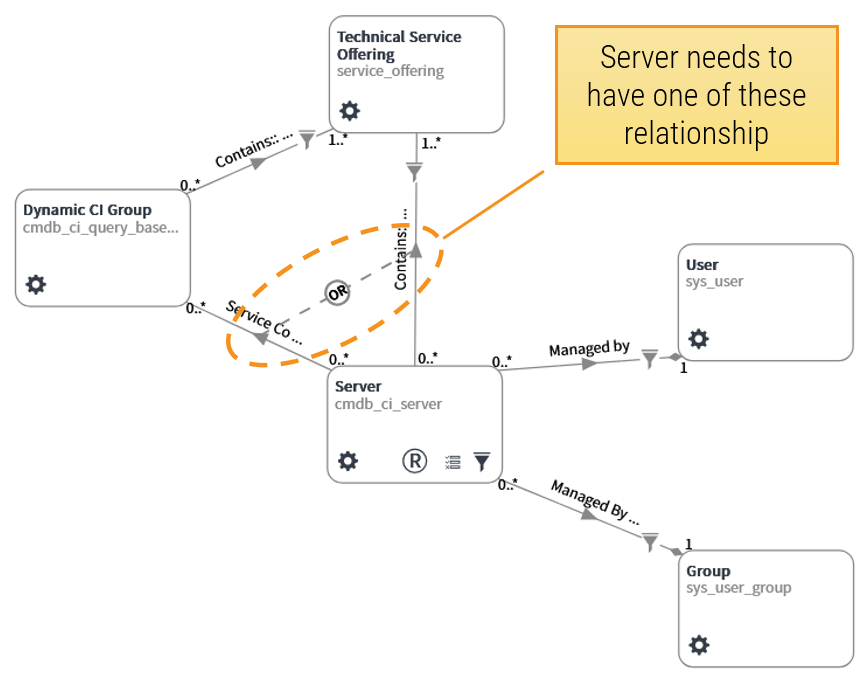
In the above Blueprint, we are again using an Alternative Link group to define servers that are part of a Dynamic CI Group through a “Service Association” record or have a direct CI relationship with a technical service offering. If you have decided to use only one method to maintain these relationships, then the Blueprint can be more precise and not give any options.
3 – Ensure Orphan Records Are Managed Properly
When your Blueprints are ready, the next step is to run Audits on your data. You will get very detailed results that you can use to fix deviations and ensure your Servers are properly related to business and operations according to our requirements.
The audit results can be dynamically assigned to different data providers, resulting in personal data quality metrics and actionable audit findings.
Check out this video to see how auditing data works.
When you schedule audits to run regularly, you’ll make sure that your data will remain in good shape. With regular audits, DCM can quickly identify when new Server, Application Services, or other Configuration Items (CIs) are added to the CMDB without the necessary connections and ownership details.
DCM can then automatically assign tasks to the relevant people or teams to fix these issues. Updating this information while it’s still fresh is much simpler than correcting these errors for thousands of records a few months later or when they have already caused potentially expensive incidents.
Data Content Manager can help automate your data quality management on ServiceNow without development, scripting, or customizations. Just draw your Blueprints, and the rest will follow.
Additional CSDM Resources
Data Content Manager has been created to help find and fix data quality issues in ServiceNow with a single, comprehensive tool that is easy to understand and use. Aligning with the CSDM is a prime use case. To learn more, feel free to browse through these free resources:
Book a call with us to learn more.